


Using the VAT Tool
The Vulnerability Assessment Tracker (VAT), at vat.dso.mil, is where Findings Verified, ABC, and ORA status live for every container in Iron Bank, and where CVE-level findings get justified.
VAT is separate from the Iron Bank image catalog
Browsing images, pulling an image, and downloading its Body of Evidence happens on the Iron Bank image catalog (ironbank.dso.mil). VAT is specifically where findings are reviewed and justified.
VAT has two kinds of users:
- Downstream (consumers) — view Findings Verified, ABC, ORA, and any existing justifications for a container, to help decide whether to accept its risk.
- Upstream (contributors) — do everything a downstream user can, plus justify findings and update a finding's status on their own images.
The VAT catalog
Findings first appear in VAT once your pipeline reaches the Findings stage, which posts all scan results there — see Pipeline for the full six-stage walkthrough. From that point on, visiting vat.dso.mil shows the catalog of every image in Iron Bank, each with its findings status at a glance.
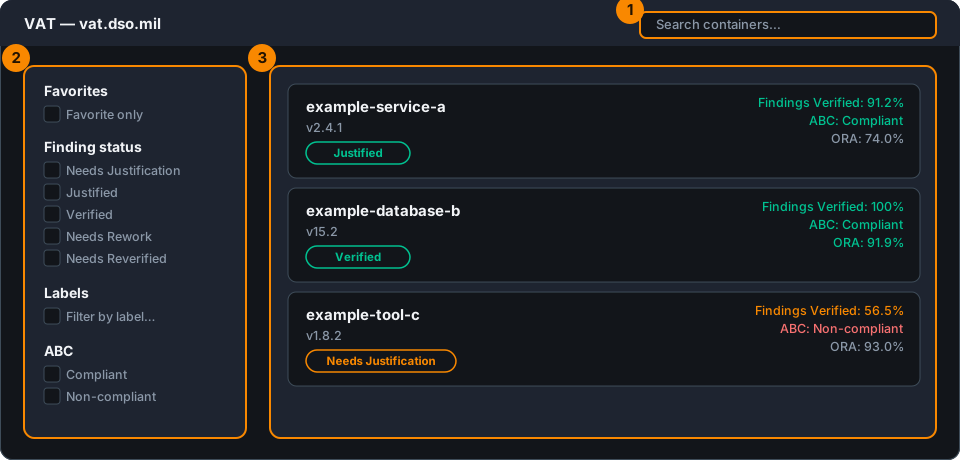
- Search for a specific container by name
- Filter by Favorites; finding status (Needs Justification, Justified, Verified, Needs Rework, Needs Reverified); labels; or ABC compliance
- Scan the results list — each container shows its Findings Verified, ABC, ORA, and any existing justifications right in the list
Viewing and justifying findings
Clicking into an image shows its tag/version, Findings Verified, ABC, and ORA, along with every CVE associated with that version.
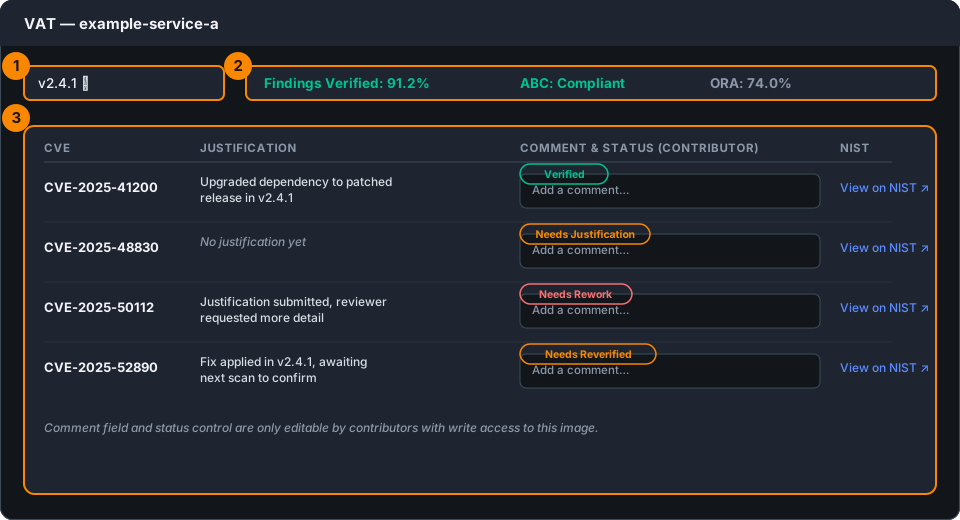
- Tag/version selector — switch between available versions of the container
- Findings Verified, ABC, and ORA summary for that version
- Per-CVE table:
- Justification — any existing justification for that finding
- Comment & status — if you're a contributor with write access, add a comment and update that finding's status here
- NIST — a link to the corresponding NIST entry to research the CVE further
A good ORA score doesn't guarantee ABC compliance
It's possible for a container to have a strong ORA score while still being ABC non-compliant — for example, due to an unremediated vulnerability, a missing justification, or the image being end-of-life. Check both, not just one.
Access
Anyone can browse VAT and view findings without requesting anything — that's read-only access, and it's the default for everyone. To submit or edit a justification, you need write access to that specific image: open an Access Request issue in your GitLab (Repo1) repository, specifying which container image(s) you need write access to.
Once you submit a justification in VAT, it isn't the final word — a Container Hardening Team (CHT) cybersecurity engineer reviews it and either approves it or sends it back for rework. That review loop is what moves a finding between the statuses you see in the VAT filters (Needs Justification → Justified → Verified, or back to Needs Rework if CHT isn't satisfied). The full submit-and-review workflow, including GitLab labels, is covered step by step in Justifications.
Why timeliness matters
How quickly vulnerabilities are mitigated is a direct input to your container's score — the longer a finding stays open and unmitigated, the more it affects you. Vendors and contributors are responsible for maintaining and patching vulnerabilities surfaced by Iron Bank's scanning tools; see Justifications for the process.
Published images are monitored continuously, with scans running roughly every 12 hours — so a fix you push today may not show as resolved in VAT until the next scan cycle runs.
Related pages
- ABC — full compliance policy
- Justifications — how to submit a justification for a finding
- Pipeline — how findings get into VAT in the first place