


Update Your Account Information
Overview
Keep your P1 account information accurate and current.
Depending on what you're changing, you may be able to update it directly in your P1 account profile. Some information may require Help Desk assistance.
Update information from your profile
Review the account information available in your profile.
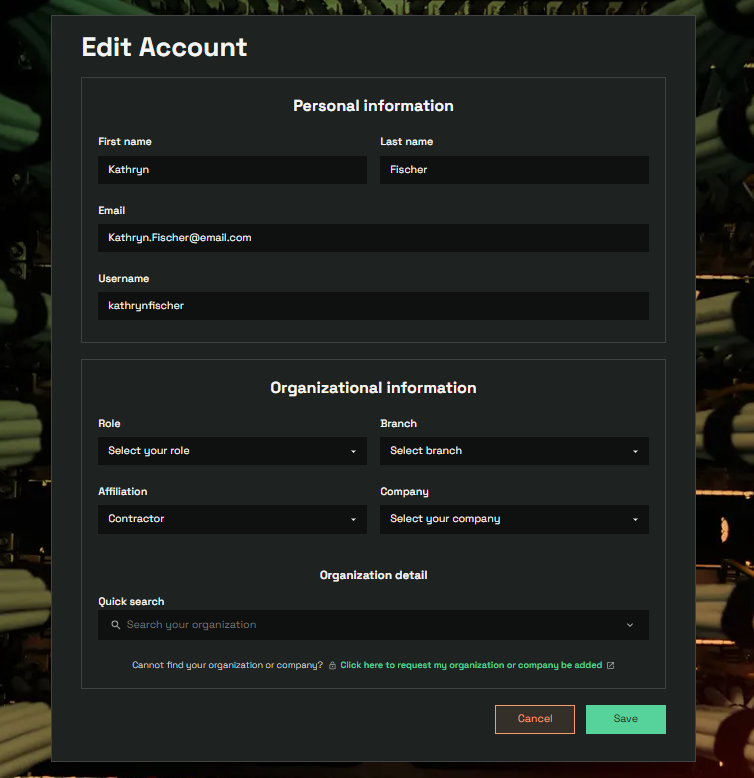
Select the field you need to update, if editing is available.
Enter the correct information.
Save your changes.
Sign out and sign back in if needed to confirm the update.
If you cannot edit the information
Some account information may not be available for customers to change directly.
If the field cannot be edited:
- Do not create another P1 account to correct the information.
- Contact the Help Desk.
- Identify the account information that needs to be updated.
- Follow the verification or update instructions provided by the Help Desk.
WARNING
Some account information may be tied to your identity or authentication method and may require Help Desk assistance before it can be changed.
Need more help?
If you are unsure whether you can update a particular field, contact the Help Desk before creating another account or making additional changes.